
How to Enable Exhibitors for an Event
-
Check Event Creation
-
When creating a new event, make sure to select Yes for the question This event has exhibitors in the event creation box.
-
-
Update an Existing Event
-
If the event was created without exhibitors, you can edit it to enable the setting:
-
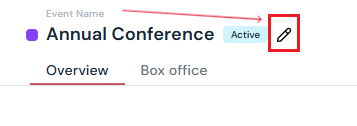
Hover over the event title and click the edit button.
-
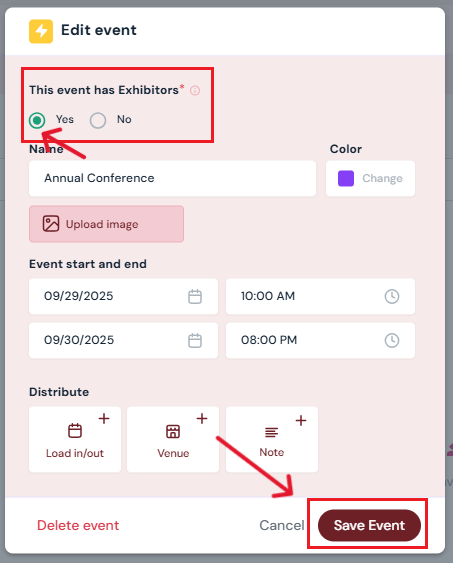
In the pop-up, select Yes for This event has exhibitors.
-
Click Save Event.
-
-
Confirm Exhibitors Tab
-
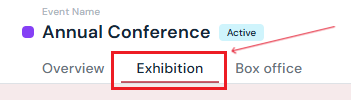
Once saved, the Exhibitions tab will appear in the Event Details menu.
-
Tip: Exhibitors can be enabled for both self-produced and collaborative events.
- Collaborative events: only producers can set prices for booths. Booth extras can be sold by the Venue OR the Producer. Both Venue and Producer can invite exhibitors. All documents, kits, and terms and conditions can be added and viewed by both parties.
- Self-Produced events: the Producer will independently manage all functions for the exhibition.
Next Steps
Create/Edit/Delete an exhibitor booth
Assign a booth to an exhibitor
Add/Edit/Delete booth extras for exhibitors
Request documents from exhibitors through Sho-Soft
Build exhibitor kits for all exhibitors to access
Build terms and conditions for exhibitors
Add/Edit/Delete representatives to serve as the primary point of contact for exhibitors
See how venues can invite a producer to Sho-Soft for a collaborative event