
How to Build Terms and Conditions
-
Open the Terms and Conditions Page
-
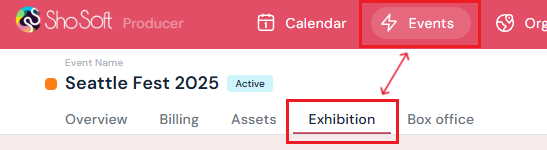
Navigate to the Exhibition section (if you do not see the Exhibitions tab follow the step outlined for adding exhibitions to an event).
-
-
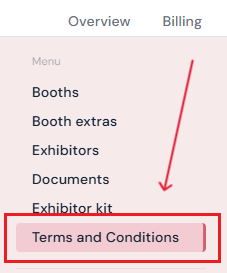
Select Terms and Conditions from the side menu.
-
-
Start Building the Terms and Conditions
-
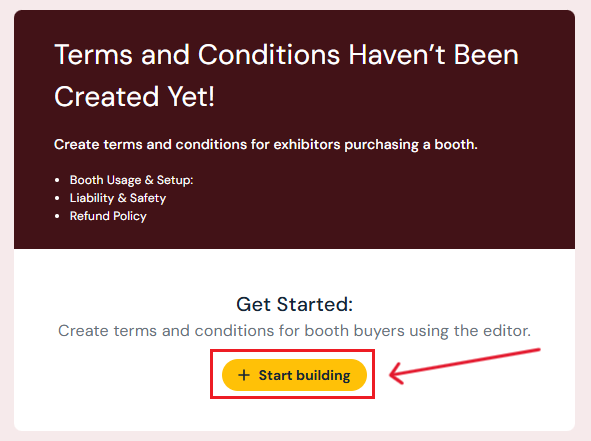
Click the yellow Start Building button.
-
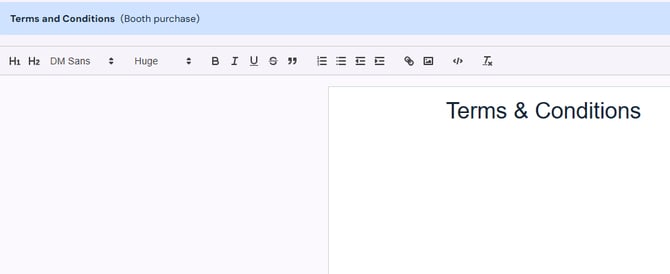
A blank document will open.
-
Type directly into the document editor or copy and paste content from another source.
-
-
Save or Publish the Terms and Conditions
-
If the document is incomplete, click Save Changes to keep your progress.
-
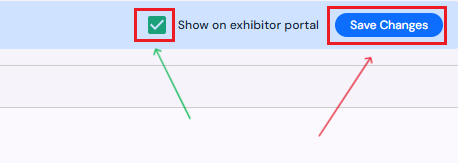
To publish the Terms and Conditions so all exhibitors can access them in the Exhibitor Portal:
-
Toggle Show on Exhibitor Portal.
-
Click Save Changes.
-
-
Next Steps
Create/Edit/Delete an exhibitor booth
Assign a booth to an exhibitor
Add/Edit/Delete booth extras for exhibitors
Request documents from exhibitors through Sho-Soft
Build exhibitor kits for all exhibitors to access
Add/Edit/Delete representatives to serve as the primary point of contact for exhibitors