
Exhibitor staff passes are available for events that have exhibitions only. See how to add exhibition to your event if you have exhibitors and need to issue exhibitor passes.
Note: For collaborative events with venues - only the you, as the producer, will be able to set exhibitor staff pass limits. Check for any booths created by the venue and assign limits.
Method 1: Set Guest Pass Limits During Booth Creation
When creating a booth under the Exhibition tab, you can set exhibitor guest pass limits directly in the booth setup form.
These limits will automatically appear on the Exhibitor Guest Pass Limits page in the Box Office tab once the booth is created.
Method 2: Create Guest Pass Limits from the Box Office Tab
-
Access the Event's Details Page
Navigate to the Bos Office section.
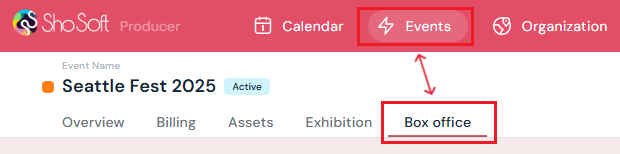
-
Select Exhibitor Passes Limit from the side menu.
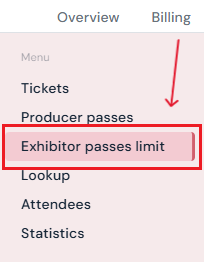
- Go to the Exhibitor Guest Pass Limits tab
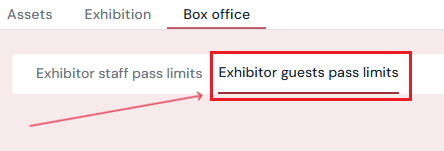
-
Start Exhibitor Guest Pass Limit Setup
-
Click the yellow Set Pass Limit button.
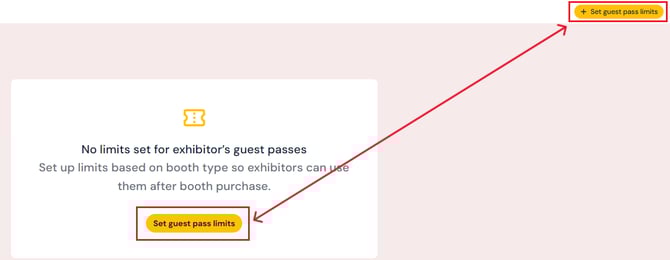
-
-
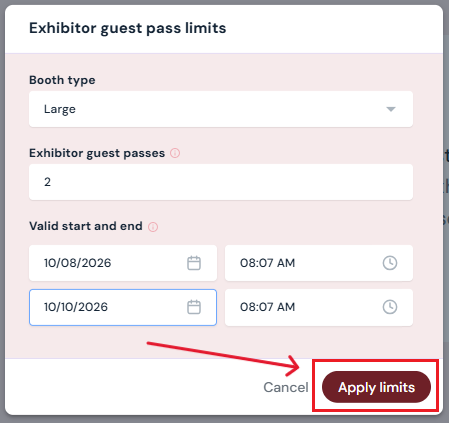
Enter Pass Details
-
Select Booth Type: Choose the booth type from the dropdown. (Note: The booth must first be created under the Exhibition tab for it to appear here.
-
Guest Pass Limit (Per Booth): Specify the maximum number of passes allowed per booth.
-
Validity Dates & Times: Set the start and end date/time for when the passes will be valid.
-
- Click the maroon Apply Limits button to save.
How to Edit Guest Pass Limits
To make changes to existing limits, you’ll need to edit the booth directly under the Exhibition tab. (See Exhibition: Create/Edit/Delete Booth for step-by-step instructions.)
Note: For collaborative events with venues - only the you, as the producer, will be able to set exhibitor staff pass limits. Check for any booths created by the venue and assign limits.
How to Delete Guest Pass Limits
-
Go to the Exhibitor Guest Pass Limits page in the Box Office tab.
-
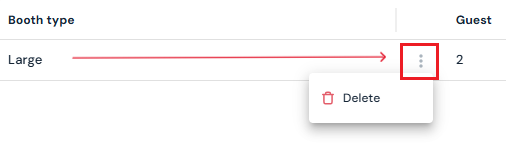
Hover over the entry you want to remove. Click the three-dot menu next to the booth type.
-
Select Delete. The pass limit will be deleted immediately.
Next Steps
Create/Edit/Delete tickets in your box office for attendees
Add promo codes for event tickets through the box office
Create/Edit/Delete producer staff passes
Create/Edit/Delete producer guest passes
Create/Edit/Delete exhibitor staff pass limits
Lookup or check-in attendees for an event
View a comprehensive list of attendees for an event
Use the box office statistics page to asses event performance
Add/Edit/Delete support contacts to your ticketing store to help answer attendee inquiries