
Why Create a Detailed Venue Profile?
-
Centralized Information: Give your staff easy access to accurate venue details.
-
Efficient Scheduling: Event planners can quickly confirm availability and capacity.
-
Better Client Experience: Amenities, images, and accurate descriptions help clients visualize the space.
How to Create a Venue Profile
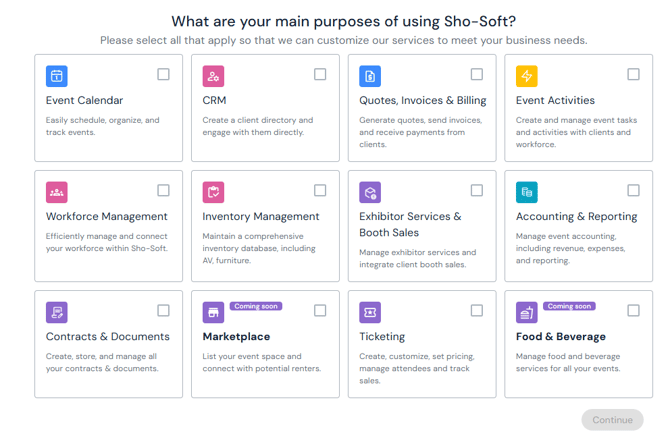
Step 1 – Select Purposes for using Sho-Soft
-
Check all boxes that apply to your venue.
Step 2 – Verify your account
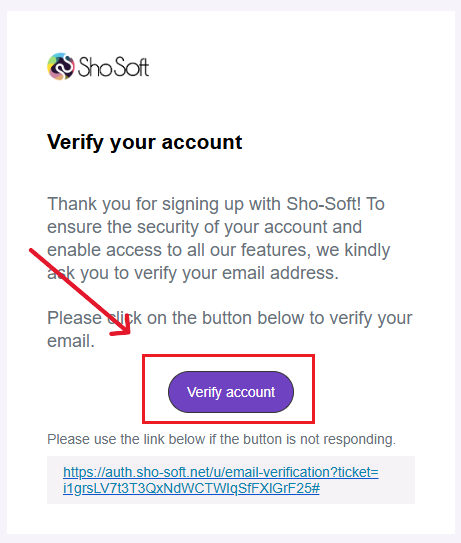
- After signing up, check your inbox for the verification email from Sho-Soft.
- Open the email and click Verify Account.
- You’ll be redirected back to the Sho-Soft welcome page with the setup list.
Next Steps: Venue Setup List
Follow the guided venue setup list to finish building out your venue profile. This includes adding capacity, amenities, images, and staff members to ensure smooth event management
Follow the guided event setup list to add your first self-produced or collaborative event