
Accessing the Attendees Information Page
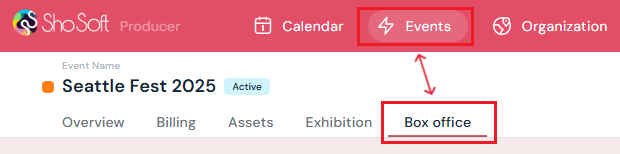
- Access the Event's Details Page
-
Navigate to the Box Office section.
-
-
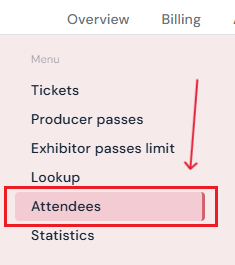
Select Attendees from the side menu.
Attendee Information Chart

On this page, you’ll see a detailed chart with the following columns:
-
Pass ID – Unique identifier for each attendee’s ticket or pass.
-
Ticket Name – The type of ticket or pass (e.g., General Admission, VIP, Staff Pass).
-
Holder Name – The attendee’s full name.
-
Email – Contact email address associated with the ticket or pass.
-
Status – Indicates whether the attendee has Checked-In, is still Open, or the ticket is Invalid/Expired.
-
Type – Specifies the kind of access (e.g., Ticket, Producer Guest Pass, Staff Pass).
-
Valid / Expiry Dates & Times – Displays when the ticket or pass becomes valid and when it expires.
Available Actions

You can perform several actions directly from the Attendees page:
-
Export to CSV - Download the entire attendee list as a CSV file for offline records or reporting.
-
Check-In Status - Click the Check-In Status button to see the total number of attendees who have checked in.
-
Filter by Type or Status - Use the Filter options to narrow down attendees by ticket/pass type (e.g., Staff, Guest, Ticket) or by status (e.g., Checked-In, Open, Invalid).
-
Search by Name or ID - Quickly locate a specific attendee by typing their name or pass ID into the search bar.
Next Steps
Create/Edit/Delete tickets in your box office for attendees
Add promo codes for event tickets through the box office
Create/Edit/Delete producer staff passes
Create/Edit/Delete producer guest passes
Create/Edit/Delete exhibitor staff pass limits
Create/Edit/Delete exhibitor guest pass limits
Lookup or check-in attendees for an event
Use the box office statistics page to asses event performance
Add/Edit/Delete support contacts to your ticketing store to help answer attendee inquiries