
Note: The Box Office feature is available to the venue for self-produced events only. When collaborative is selected as the event type, the invited producer linked to the event will have access to the Box Office and is responsible for setting up ticketing. In these cases, the venue will not see or manage the Box Office tab.
How to Enable Box Office for an Event
1. Set Up During Event Creation
- When creating a new event, make sure to select Self-Produced for the event type.
2. Update an Existing Event
-
If the event was not initially created as self-produced, you can edit it to enable the setting:
-
Hover over the event title and click the Edit button.
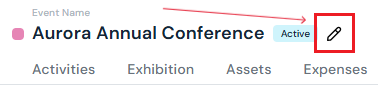
-
In the pop-up, change the event type to Self-Produced.
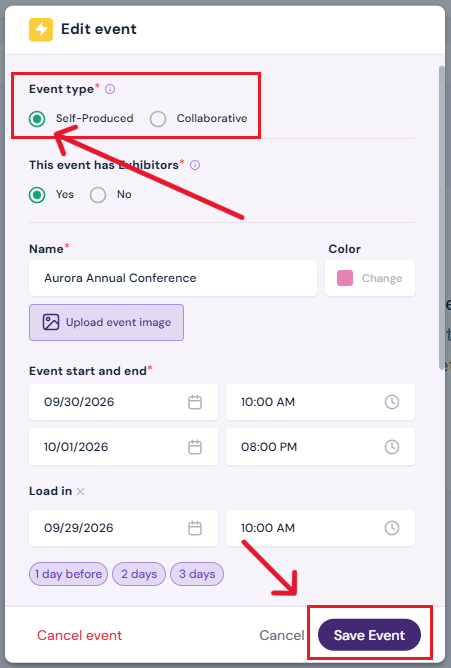
-
Click Save Event.
3. Confirm Box Office Tab
-
Once saved, the Box Office tab will appear in the Event Details menu.
Next Steps
Create/Edit/Delete tickets in your box office for attendees
Add Promo Codes for event tickets through the box office
Create/Edit/Delete producer staff passes
Create/Edit/Delete producer guest passes
Create/Edit/Delete exhibitor staff pass limits
Create/Edit/Delete exhibitor guest pass limits
Lookup or check-in attendees for an event
View a comprehensive list of attendees for an event
Use the box office statistics page to asses event performance
Add/Edit/Delete support contacts to your ticketing store to help answer attendee inquiries