
How to Invite Team Members
- Under setup on the left-hand side, click Team Members.
- Your own information will already be pre-populated on the page.

- Click the yellow Invite Team Members button.
- Enter the email address for one or more team members.
- Select the role for the team member/s from the dropdown menu.
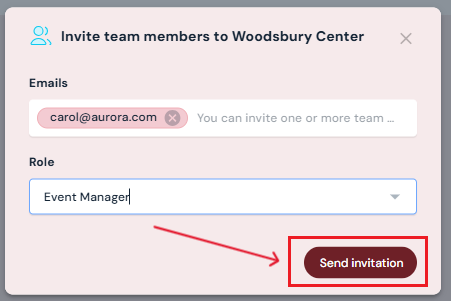
- Click Send Invite.
Your team members will receive an email invitation and follow the steps to set up their individual accounts.
Next Steps
Learn more about how invitations work and how team member invitations and sign-up
Review team member roles and permissions in Sho-Soft to assign roles and grant permissions appropriately
Add/edit/delete Team Members anytime on the Team Members page